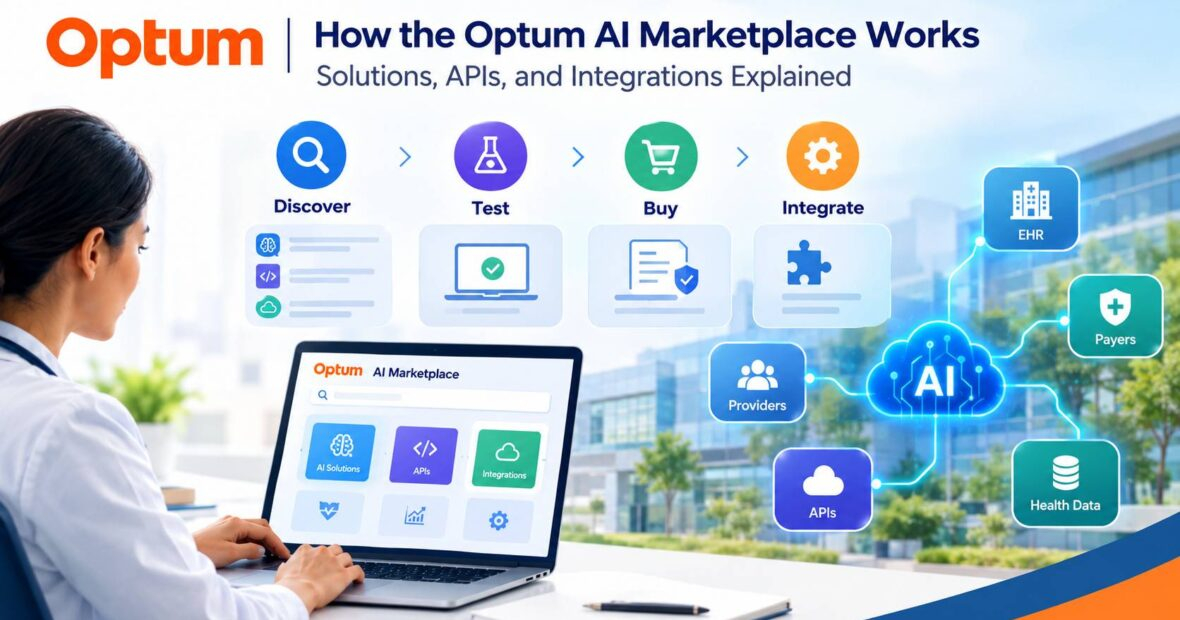
The Optum AI Marketplace works as a storefront and a developer portal working together. You find a product on marketplace.optum.com, test it in a sandbox through Optum’s developer portal, then subscribe or contract to get production access. For API products, the integration itself happens in your own software, using documented REST APIs.
This article walks through that process using Optum’s public marketplace pages and developer documentation. It covers the solutions listed, what the APIs do, how authentication and data formats work, which integration paths are documented, and what to evaluate before committing. Where Optum’s public materials stop, such as rate limits or contract terms, the article says so.
The Marketplace and Optum’s Broader AI Work
Optum, part of UnitedHealth Group, launched the marketplace on June 25, 2025. The About page describes it as a place to explore, test, and purchase software, APIs, and services built with AI. UnitedHealth Group also owns UnitedHealthcare, but the marketplace is an Optum product.
The marketplace is a commercial channel, not a catalog of everything Optum does with AI. Optum’s CEO has said in an NEJM Catalyst interview that the company has more than 1,000 AI use cases across its operations. That figure describes Optum’s internal and enterprise work, and it does not tell you how many products you can buy through the marketplace. Treat each listing as its own product with its own documentation.
How the Marketplace Works, Step by Step
The flow below comes from the marketplace pages and the developer portal’s getting-started guide.
1. Discover. You can browse by category or describe your use case to the site’s AI assistant (labeled beta), which warns users not to enter personally identifiable information or protected health information. Product pages show a description, the product type (API, software, or partner offering), and often a purchase option.
2. Test in the sandbox. For API products, you request sandbox access through a form, and an Optum team member follows up with a sandbox client ID and secret. Optum’s docs describe sandbox access as a free trial with no financial obligation. The sandbox returns canned responses based on preloaded values, so it shows what a response looks like but does not prove your integration will work against live payer data. Optum’s docs also say not to run load tests or production data tests there.
3. Subscribe or contract. Optum’s documentation says you can buy API products directly in the marketplace. The Optum Real for Dental docs describe subscribing and enrolling in an API product and selecting a contract term there. The path is not identical across products, though.
The documentation for the Prior Authorization API says to contact your Optum representative to contract for production, and the marketplace also offers quotes and a Contact sales option. For third-party products, the site says your information may be shared with the third-party seller.
4. Go live. Production credentials arrive after contract signing or once a subscription is processed. Sandbox and production use separate credentials.
One operational detail from the Optum Real product page shows how practical this gets: your marketplace account must use the company name that appears in box 1 of your organization’s W-9, with an exact match, or orders may hit processing problems.
What Solutions Are Available
The catalog is organized into categories: patient and member engagement, eligibility and claims, care operations and management, payment and reimbursement, analytics and insights, pharmacy solutions, data access and interoperability, and two Optum Real groupings for medical and dental. Listings fall into three rough types.
- Optum APIs. The clearest examples are the Optum Real APIs and the eligibility and claims APIs covered in the next section.
- Optum software. CareSelect Risk Assessor, for instance, pulls patient data from a connected EHR to calculate breast cancer and BRCA risk scores using the Tyrer-Cuzick model. The homepage summary does not describe it in AI terms.
- Partner products. The homepage features ServiceNow, Microsoft, Suki, DeliverHealth, Parakeet Health, Nirvana OneVerify, John Snow Labs, and Hyro. Suki’s listing describes ambient AI for EHR-integrated workflows that converts clinical conversations into structured data for documentation and coding.
The name “AI Marketplace” can suggest every listing is an AI model. In practice the catalog mixes AI-enabled products with APIs and conventional software, so read each listing for what the product actually does. The Optum Real API pages, for example, describe real-time data exchange between providers and payers and do not spell out which AI methods, if any, sit behind each endpoint.
Does the Optum AI Marketplace Provide APIs?
Yes, and they are well documented. Optum’s developer portal (branded API & Services Connection) hosts guides and API references organized by category, including Optum Real, Eligibility and Claims, Payment and Reimbursement, Pharmacy Solutions, Patient and Member Engagement, Analytics and Insights, and Interoperability.
What the APIs do
Optum Real for Medical lists seven modules:
- Pre-Service Eligibility: real-time eligibility inquiries before the patient’s visit.
- Patient Benefit Check: validates benefits and prior authorization or referral requirements before care.
- Claim Pre-Check: real-time claim inquiries before treatment, to catch likely denials early.
- Referral Actions: submit, track, and manage prior authorization and referral requests.
- Claim Actions: submit claims, reconsideration requests, appeals, and supporting documents.
- Claim Inquiry: real-time claim status, summaries, and details.
- Document Search: retrieve documents such as EDI 835, provider remittance advice, explanations of benefits, provider letters, and virtual card payment documents.
An Optum Real dental product covers eligibility, benefits, prior authorization, and pre-care estimates for dental providers.
The separate Eligibility and Claims portal documents a broader set. Its Eligibility API takes the standard X12 270 eligibility transaction and formats it as JSON for an HTTP request. It also converts the X12 271 response into JSON, with details like copays, coinsurance, and deductibles. The portal’s documentation index also lists claim status (276/277), claims, attachments, and authorization inquiry and submission, plus JSON-to-EDI mapping references.
The Optum Real page says the APIs are currently live with UnitedHealthcare, with additional payers planned. “Multiple payers through a single integration” describes the design, but your actual coverage depends on the supported payer IDs for each API. Fierce Healthcare reported that Optum Real was piloted with UnitedHealthcare and Allina Health.
Documentation and tooling
The portal provides guides, an API reference with a Try It interface, downloadable OpenAPI specs, and an interactive developer community. Optum says Postman collections and environment files are available for most of its APIs. Some pages and older URLs still carry the Change Healthcare name, which reflects where parts of the API portfolio originated. One onboarding page warns that an old Change Healthcare domain is no longer supported, a small reminder that you should confirm current endpoints in the docs.
Authentication and security
Optum’s onboarding documentation says its APIs are private and accessible only over HTTPS, protected with OAuth 2.0 bearer tokens. You use a client ID and client secret to request a short-lived token via Optum’s Security and Authorization API. New customers must use version 3; version 2 is for existing legacy consumers, and moving between them involves a migration process.
The Prior Authorization API documentation adds that its calls use TLS 1.2 or later, that its tokens last one hour, and that Optum Enterprise APIs on that platform are secured with JSON Web Tokens. Those specifics are documented for that API, so confirm them for any other product you plan to use.
Data formats and prerequisites
The documented APIs are REST APIs that consume and return JSON. X12 sits underneath for several of them: the Eligibility API accepts JSON built from a 270 request, and a separate raw X12 endpoint accepts a native 270 string wrapped in a JSON field. Before using that raw endpoint, the docs say to contact your Optum implementation analyst, because it needs custom headers and customer-specific payer list arrangements.
The extensive JSON-to-EDI mapping documentation suggests that familiarity with X12 transactions will help your developers, even where Optum handles the translation.
What to confirm directly
Public documentation does not replace your contract. Rate limits, uptime commitments, support terms, and exact pricing are typically negotiated or product-specific, so ask Optum before you sign. The Optum Real medical page includes a pricing view with starting packages, but check current figures rather than relying on any secondhand number.
How Integrations Work
The documentation supports a straightforward model: Optum exposes APIs, and your software calls them. The Optum Real page describes accessing eligibility data “within your existing EHR system” through a centralized API. Some practice management or EHR vendors will do that integration for you; others leave it to your IT team or a contractor.
The Optum Real page also confirms that software vendors can subscribe on behalf of their provider clients, with each client’s billing TIN associated with the vendor’s active subscription.
Four common integration approaches show where Optum’s documentation is explicit and where it is not:
| Approach | What it means in general | What Optum’s public pages show |
|---|---|---|
| Direct API integration | Your developers call the vendor’s REST APIs | Documented, with sandbox, OpenAPI specs, and OAuth 2.0 |
| Vendor-mediated | A software vendor integrates and offers the capability to its clients | Documented for Optum Real (vendors subscribe for provider clients) |
| Prebuilt connector | A packaged connector for a specific EHR or system | Not confirmed for Optum’s APIs; some partner listings mention EHR integration |
| Custom or raw EDI | Tailored data exchange, often in native X12 | Raw X12 eligibility endpoint exists, with analyst involvement required |
The portal also hosts implementation guides named for Argonaut (a FHIR-focused industry effort) and CDS Hooks (an HL7 standard for clinical decision support). That points to interoperability resources beyond claims and eligibility, but check the specific guide for scope before assuming support for your use case.
Teams sometimes ask whether AI agents can call these APIs. Optum’s Optum Real for Dental developer docs include a note pointing AI agents to an llms.txt index of the documentation in Markdown with OpenAPI endpoints.
That is a documentation convenience, not a statement that Optum supports any particular agent-based integration, and the credentials, contract, and PHI rules apply to software agents just as they do to any other client.
Teams researching agent-based automation more broadly can browse an AI Agent Marketplace for general-purpose options, though healthcare use adds the compliance requirements discussed below.
Practical Use Cases the Documentation Supports
These are use cases that Optum’s own pages describe, not an exhaustive list of what the marketplace offers:
- Front-desk eligibility and benefits. Verifying coverage and what a patient will owe before the visit, using eligibility and benefit check APIs.
- Denial prevention. Checking claim information before treatment or submission to catch problems early.
- Claim follow-up. Pulling claim status and retrieving remittance documents and EOBs for reconciliation.
- Prior authorization and referrals. Submitting and tracking requests through an API instead of portals or fax.
- Documentation support. Ambient clinical documentation through a partner such as Suki.
An illustrative example, not a real Optum customer: a practice management software company with a few hundred clinic clients subscribes to the eligibility API on their behalf, adds a benefits check step to its patient scheduling screen, and associates each clinic’s billing TIN with its account.
The vendor would still need to confirm that its clients’ payers appear in the supported payer ID list, since live coverage currently centers on UnitedHealthcare.
Security, Privacy, and Compliance Considerations
Nothing on Optum’s public pages makes a given listing automatically HIPAA compliant for your use, and you should not assume otherwise. Several points apply.
- HIPAA obligations are shared. HHS guidance says a cloud service provider that creates, receives, maintains, or transmits electronic protected health information on a covered entity’s behalf is a business associate, which calls for a business associate agreement and your own risk analysis. See HHS’s cloud computing guidance. Whether a specific marketplace product involves PHI, and which agreements apply, depends on the product and your role as a provider, payer, or vendor.
- Technical controls are not certifications. OAuth 2.0, HTTPS, and TLS requirements described in Optum’s docs are access and transport controls. They do not substitute for security documentation. Optum’s site links to a page on its commitment to cybersecurity; ask for product-level security documentation as part of procurement.
- Sandbox hygiene. Optum’s docs tell users not to send production data to the pre-subscription sandbox. Follow the rules for the specific product you are testing.
- Regulatory context. The CMS Interoperability and Prior Authorization final rule (CMS-0057-F) requires certain payers to implement FHIR-based APIs and improve prior authorization processes. That rule applies to specific payers. It does not tell you whether any Optum API meets those requirements, so ask vendors directly which standards a product supports.
- Governance and maintenance. Plan for credential storage, role-based access to who can trigger calls, logging, and a named owner for the integration. Ongoing effort is real: the move from Security and Authorization v2 to v3 and the retirement of an old domain are examples of changes that can require developer time after launch.
How to Evaluate an Optum Solution
| Area | Questions to ask |
|---|---|
| Business requirements | Which workflow does this fix, and what will we measure (denial rate, staff hours, call volume)? |
| Verified functionality | Does the documentation show the exact transactions we need? Is the AI component described or only the data exchange? |
| Data compatibility | Do we work in JSON, X12, or both? Are our payers on the supported list? |
| API and integration requirements | Who builds and maintains the integration: our team, our EHR vendor, or a contractor? |
| Security and privacy | What agreements, documentation, and controls come with this product? Where is PHI involved? |
| Implementation effort | What is required to move from sandbox to production, and does X12 expertise come into play? |
| Pricing and contract | What are the package options, contract term, and exit terms? |
| Maintenance and support | How are version changes announced, and what support is included? |
Optum AI Marketplace vs. Other Marketplaces
These platforms are built for different jobs. Optum’s marketplace is a healthcare-specific catalog tied to Optum’s API portfolio and partners. Epic’s Showroom replaced Epic’s earlier App Market as a way to connect vendors with Epic’s provider customers.
General cloud marketplaces catalog software across industries. A broader catalog of AI tools for US buyers, such as AI Marketplace USA, covers AI products generally and is not a substitute for healthcare-specific integration and compliance review.
| Optum AI Marketplace | Epic Showroom | General AI and cloud marketplaces | |
|---|---|---|---|
| Primary purpose | Find, test, and buy healthcare AI, APIs, and software | Find vendors that integrate with Epic | Discover and buy software across industries |
| Healthcare specialization | Healthcare-specific | Healthcare-specific, Epic-centered | Varies by listing |
| API documentation | Public developer portal, with credentials by request | Depends on vendor | Depends on seller |
| Access | Organizations and developers; terms vary by product | Epic customers and vendors | Generally open to businesses |
Conclusion
The most reliable way to learn what the Optum AI Marketplace can do for your organization is to test it. Pick one workflow, such as pre-visit eligibility checks, request sandbox access for the matching API, and have a developer run sample calls. Then confirm three things in writing before you subscribe: which of your payers are live, what security and agreement documentation applies, and who will build and maintain the integration.