

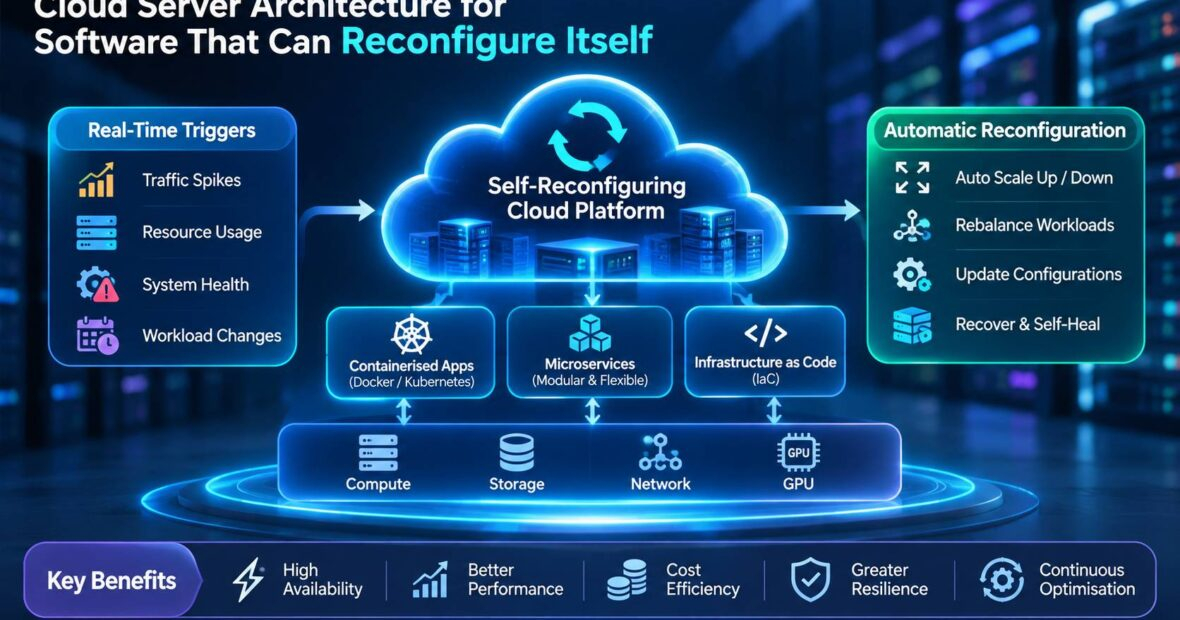
Most software today is configured by people. Engineers decide how many servers to run, which features to switch on, how much traffic each service may take and what to do when something breaks.
That approach struggles when traffic doubles in minutes, a cloud region has problems at 3 a.m. or a new release causes errors in one market but not another. Self-reconfiguring software adjusts its own settings, capacity and behavior in response to real conditions, within rules that people set.
It scales before peaks, sheds load gracefully, routes around failures and rolls back bad changes on its own. Designing the right cloud architecture for self-reconfiguring software turns these ideas into reliable systems rather than risky experiments.
The need is growing. The Uptime Institute’s outage surveys consistently show that many significant outages cost organizations hundreds of thousands of dollars or more, and human error and configuration mistakes remain leading causes. At the same time, AI models and agents now make it practical to automate decisions that once needed an engineer on call.
At CRECSO, we help US companies build cloud platforms that adapt safely. In this guide, you will learn what self-reconfiguring software means, the architecture patterns behind it, how Netflix built systems that heal and adapt at scale, cost and risk advice, common mistakes and a practical plan to get started.
What Self-Reconfiguring Software Can Change
- Capacity: Adds or removes servers and containers based on demand forecasts.
- Traffic routing: Shifts users away from failing zones, regions or versions.
- Load limits: Adjusts how many requests each service accepts to avoid overload.
- Feature flags: Turns off expensive or broken features during incidents.
- Releases: Pauses or rolls back deployments when error rates rise.
- Cost settings: Moves workloads to cheaper instance types or schedules.
Levels of Self-Reconfiguration
| Level | What Happens | Human Role |
|---|---|---|
| 1. Alerting | System detects problems and notifies people | People decide and act |
| 2. Recommended actions | System suggests specific changes | People approve |
| 3. Automatic with guardrails | System acts within safe limits | People review afterward |
| 4. Goal-driven adaptation | System pursues targets such as cost and latency | People set goals and policies |
Core Patterns in Cloud Architecture for Self-Reconfiguring Software
Control Loops
Every self-reconfiguring system follows a loop: observe metrics, analyze them, decide on a change, act and check the result. This loop, sometimes called MAPE-K in research, should be explicit and testable.
Predictive Scaling in Cloud Architecture for Self-Reconfiguring Software
Instead of reacting to load after it arrives, systems forecast demand and add capacity in advance. Features such as predictive scaling in Amazon EC2 Auto Scaling use machine learning on past traffic to schedule capacity ahead of daily and weekly peaks.
Adaptive Load Shedding
Services measure their own latency and reduce accepted traffic when they slow down, protecting the system from cascading failures. Lower-priority requests are dropped first.
Automated Failover in Cloud Architecture for Self-Reconfiguring Software
Health checks detect failing zones or regions, and traffic managers move users automatically. Data replication and capacity in other regions make this possible.
Progressive Delivery
New releases reach a small share of users first. Automated analysis compares error rates and latency with the previous version and rolls back without waiting for a human.
Policy Guardrails
Rules define what the system may change, how far and how fast, such as maximum scale-up per hour or regions that must always keep minimum capacity.
Real Business Example: Netflix
- Business challenge: Netflix streams to hundreds of millions of members worldwide, with large peaks in the evening and during major releases. Any outage is highly visible. Running on AWS, Netflix needed its systems to survive server failures, zone problems and even regional disruptions without manual firefighting.
- Solution: Netflix built a culture and toolset around resilience and automation. It created Chaos Monkey in 2011 to randomly shut down servers in production, forcing services to handle failures automatically. It later developed tools for regional traffic evacuation, adaptive concurrency limits and automated canary analysis for releases.
- Implementation: Netflix services use adaptive limits that adjust to current latency, automated canary analysis that compares new versions with old ones and traffic tools that can shift members away from a troubled AWS region. Netflix open-sourced several of these tools for others to use.
- Outcome: Netflix has described being able to evacuate traffic from an AWS region within minutes and has generally maintained service during cloud incidents that affected other companies more severely.
- Business impact: The example shows how cloud architecture for self-reconfiguring software can protect revenue and reputation at massive scale. The lesson is that automation must be tested constantly through practices such as chaos engineering, or it may fail when needed most.
Where AI Fits
- AI models improve forecasts, detect unusual patterns and suggest fixes faster than static rules.
- AI agents can investigate incidents, read logs and propose configuration changes.
- Use AI for analysis and recommendations first, then allow automatic actions only within strict guardrails.
- Every AI-driven change should be logged with its reasoning, so engineers can review and learn from it.
Our cloud engineering team designs autoscaling, failover and progressive delivery systems for US companies.
Avoiding Conflicting Automation
As teams add more automation, separate systems can work against each other. An autoscaler may add servers while a cost optimizer removes them, or two failover tools may move traffic in opposite directions. Assign clear ownership for each type of change, coordinate control loops through shared policies and add cooldown periods so systems do not oscillate. A well-designed cloud architecture for self-reconfiguring software keeps a single view of all automated actions, so engineers can see what changed, when and why.
Organizational Readiness
Self-reconfiguring systems change how teams work. Site reliability engineers shift from manual fixes to designing control loops and guardrails. On-call engineers need training to understand automated actions and override them when necessary. Leaders must agree on which risks the business accepts, such as automatic rollback during a major launch. Building cloud architecture for self-reconfiguring software succeeds when teams trust the automation, and that trust comes from transparency, testing and clear accountability.
Testing Self-Reconfiguring Systems
Automation that has never been tested is a hidden risk. Run game days that simulate failures, inject latency and remove capacity in controlled ways. Test what happens when automation itself fails, such as a scaling service that stops responding. Measure how quickly the system recovers and whether it overreacts. Review results and adjust guardrails regularly. Share findings across teams, because a weakness found in one service often exists in others built the same way.
Sizing and Cost Planning
- Headroom: Keep spare capacity in other zones or regions for failover.
- Observability: Budget for high-resolution metrics and traces used by control loops.
- Automation tooling: Include feature flag, deployment and traffic management platforms.
- Testing: Plan time and resources for chaos experiments and game days.
- Savings: Predictive scaling and right-sizing can offset much of the cost.
Track uptime, recovery time and cloud cost together, because self-reconfiguration should improve all three.
Pros and Cons
| Pros | Cons |
|---|---|
| Faster recovery from failures | Automation can amplify mistakes |
| Fewer late-night pages for engineers | Complex to design and test |
| Lower costs through right-sizing | Requires excellent observability |
| Consistent responses to incidents | Harder to explain automated decisions |
Best Practices
- Make every control loop explicit, logged and testable.
- Set guardrails on how much and how fast systems can change.
- Use progressive delivery with automatic rollback.
- Keep failover capacity in other zones or regions.
- Start with recommendations before full automation.
- Practice chaos engineering and game days regularly.
IT leaders can review AI for IT for related ideas.
Common Mistakes to Avoid
- Automating actions without limits or approvals.
- Scaling on a single metric that does not reflect user experience.
- Letting two automated systems fight each other.
- Skipping tests of failover and rollback paths.
- Failing to log why automated changes were made.
How to Get Started
- List the incidents and manual changes your team handles most often.
- Choose one safe, repetitive action to automate, such as rollback on high error rates.
- Design cloud architecture for self-reconfiguring software with control loops, guardrails, observability and audit logs.
- Test with game days before enabling automatic actions in production.
- Expand automation step by step as confidence grows.
Self-reconfiguring software readiness checklist:
- Frequent manual actions identified
- Metrics that reflect user experience defined
- Guardrails and limits documented
- Progressive delivery with rollback in place
- Failover capacity planned
- Game day schedule set
Automated control systems need protection from misuse, so many companies add managed cloud security to monitor them.
Future Trends
AI agents will increasingly investigate incidents and propose or apply fixes within policies. Systems will optimize for several goals at once, such as latency, cost and carbon emissions. Platform teams will define intent, and software will figure out how to meet it. Cloud architecture for self-reconfiguring software will become the normal way to run large systems, with humans focused on goals, policies and oversight.
Key Takeaways
- Self-reconfiguring software adapts capacity, routing, limits and releases on its own.
- Control loops, guardrails and observability are the foundation.
- Testing through chaos engineering keeps automation trustworthy.
- Start with recommendations and expand automation gradually.
Conclusion
Software that can reconfigure itself recovers faster, costs less to run and reduces stress on engineering teams. The right cloud architecture for self-reconfiguring software combines predictive scaling, adaptive load shedding, automated failover, progressive delivery and clear guardrails, all supported by strong observability and regular testing. CRECSO helps US companies build platforms that adapt safely to change. Ready to make your systems more self-sufficient? Talk to our cloud team today.